A player for practising section by section
Madi
Slow down the tricky move. Practise it on repeat.
Mark the part you want to practise with A and B in your own video. Slow it down and repeat that move as you follow along.

Basic practice is free · No account, just your files · 33 languages
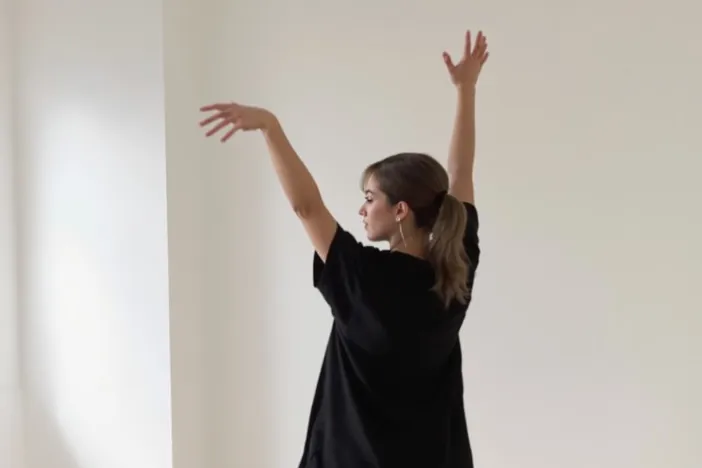
The move you want to master, one section at a time.
iPhone app in English · sample file · the photo is an AI-generated sample scene.
- iPhone · iPadApp Store · worldwide except mainland China
- AndroidGoogle Play · worldwide
Try it without installing
Just the hard part, until it clicks.
Pick a tricky part of our original practice song and listen at 0.5×. At B, it returns to A so you can hear the same part again. Sound starts only when you press play.
In the app, practise with your own videos and music. A–B loops and speed control are free.
Download this song to try in the appMusic
Those two tricky bars, at a pace your hands can follow.
Dance
A move you want to learn, on repeat in slow motion.
Listening
A line worth hearing again, until you can say it.
Make this part yours.
An original practice song · A–B loop
Press play to hear the song. Change the speed and listen.
How to start
Start with one file.
Open your file
Pick a video or song saved on your device, or one in a shared folder on your home NAS.
Pick the hard part
For music, open Practice to see the song as rows of thick bars. Tap the round A and B buttons to set the start and end, or split sections in Edit, to pick the part you want to hear again.
Repeat at your pace
Choose any speed from 0.25× to 4×, then go back to normal once it feels familiar. You can set a repeat count too.
What it does
Split it, slow it, repeat it.
This describes the iPhone and iPad app. By device, below, lists what differs on Android.
01Sections and loops
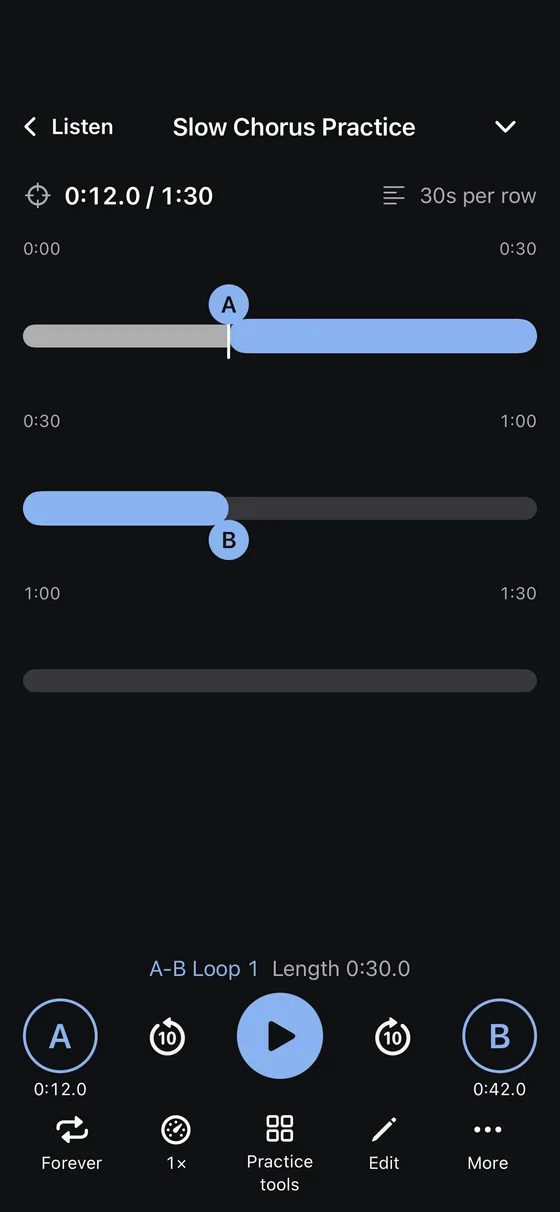
Music practice shows the song as rows of thick bars, 30 seconds per row, or 15 or 60 from the view menu. The played part is bright, your A–B loop is a bold highlighted band, and section boundaries are small gaps in the bar. Tap the round A and B buttons at both ends of the playback row to loop right away, then drag A or B, even onto the next row, or fine-tune each edge by 0.1 seconds in Edit. Split songs and videos into sections and loop neighbouring sections together. Music in standard formats such as MP3, M4A, WAV and FLAC, and MP4 and MOV files in your library loop without a gap.
02Speed and pitch
Change the speed from 0.25× to 4× in 0.01 steps while the pitch stays put. While you listen to music, the playback bar is the whole song’s waveform and the row below steps the speed down or up. With Pro, shift the pitch of music files in standard formats (MP3, M4A, WAV, FLAC and so on) in your library in semitones and cents, and use a three-band EQ and vocal reduction.
03Practice modes and beat
With Pro, choose rests between repeats, a count-in and a gradual speed ramp. Pro also finds the beat so you can practise along with a 1–8 count and a metronome locked to the song. The standalone metronome (30–240 BPM, 2–8 beats, tap tempo) is free.
04Video and dance
Opening Practice keeps the video at full size, and a bar on top shows the whole file and your A–B loop so you can drag either end. Zoom in and step through frame by frame to study a move. Pro adds mirrored video and a camera mirror that shows you beside the video, with pinch to zoom.
05Subtitles and dictation
Loop SMI, SRT, VTT and ASS subtitles or LRC lyrics line by line, and check what you heard with dictation practice. For library files in standard formats (MP4, MOV, MP3, M4A and so on) without subtitles, Pro makes them with on-device speech recognition.
06Your files, NAS and PDF scores
Practise with your own files, ad-free. Open videos straight from your home NAS, and turn PDF score pages with a tap on either side or a pedal.
Inside the app
From practice to your library.
Captured from the iPhone app in English. The songs and PDF are sample files made for this tour.
8 screens · scroll sideways
01Sections
See the rows, then loop between A and B
Free
- The song as rows of thick bars, 30 seconds per row, or 15 or 60 from the view menu
- Round A and B at both ends of the playback row loop right away; split sections in Edit and pick them from the section map
- Drag A or B, even onto the next row, or fine-tune by 0.1 seconds in Edit › Fine-tune boundaries
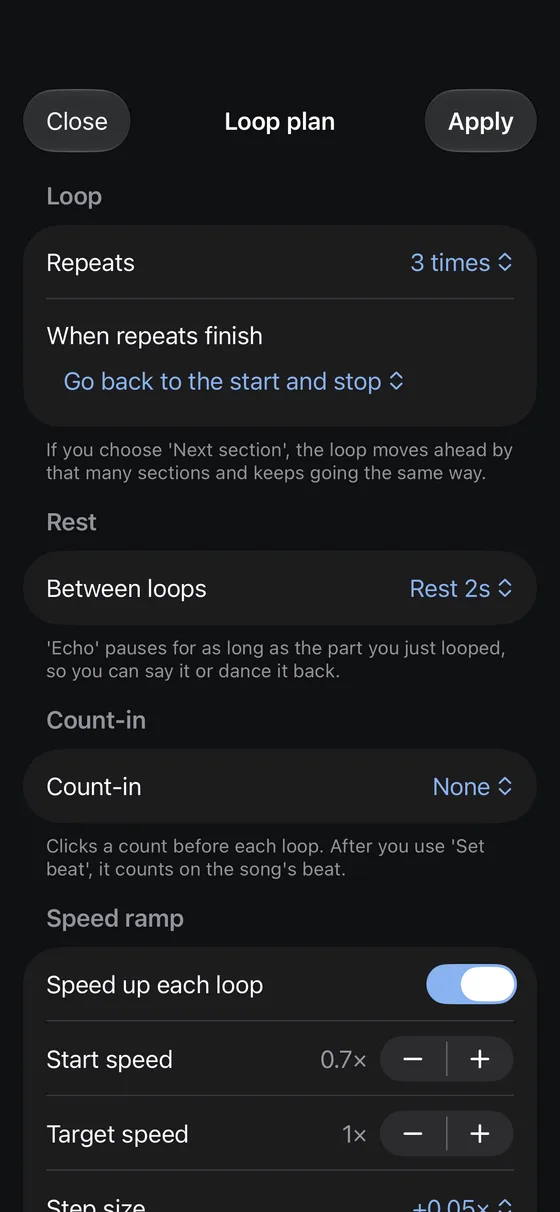
02Loop plan
How many times, with rests, getting faster
Count free · other options Pro
- A repeat count, then stop or keep playing
- Rests between repeats, echo recording and a count-in
- A speed ramp, cumulative practice one section at a time, and moving on to the next section
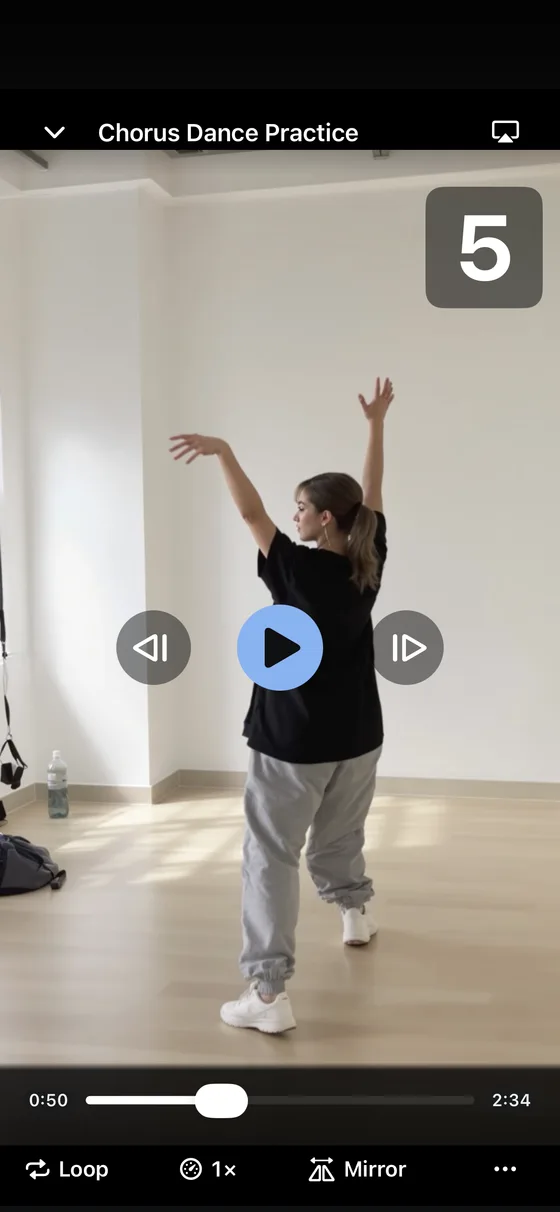
03Beat
Count the beat for dance and playing
Pro
- Tap the beat or detect it, then see a large 1–8 count
- A metronome click locked to the song, or a spoken count
- Mirror the video, or show yourself beside it with the front camera (pinch to zoom)
The video on screen is an AI-generated sample scene.
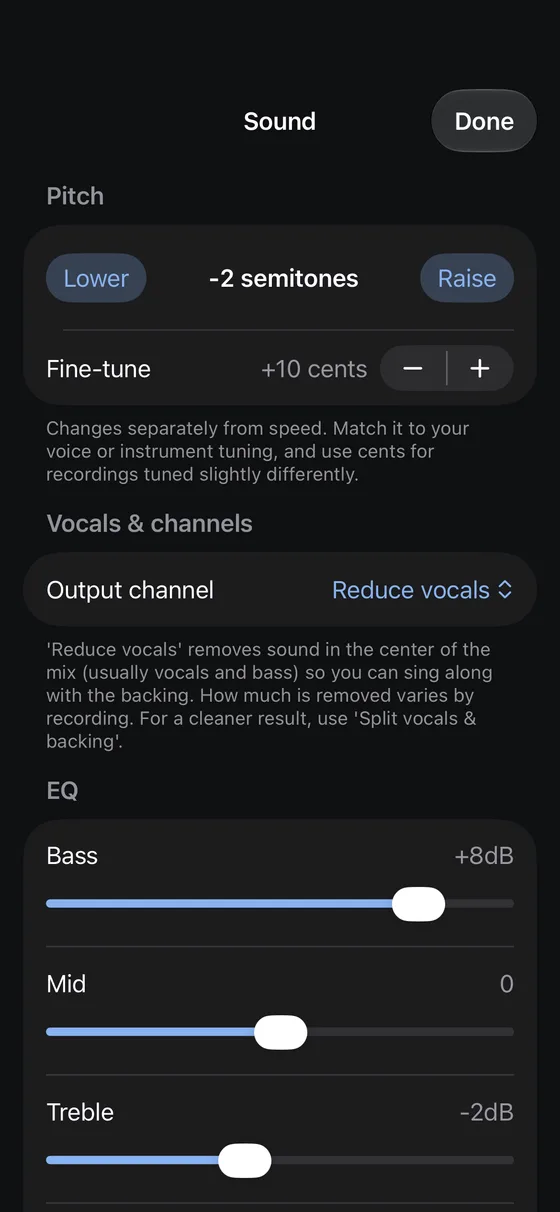
04Sound
Pitch, EQ and vocal reduction
Speed free · sound tools Pro
- 0.25–4× speed in 0.01 steps, with pitch kept as is
- On music files: pitch in semitones and cents, three-band EQ, vocal reduction (videos keep their original sound)
- Vocal and accompaniment separation and chord detection, on the device
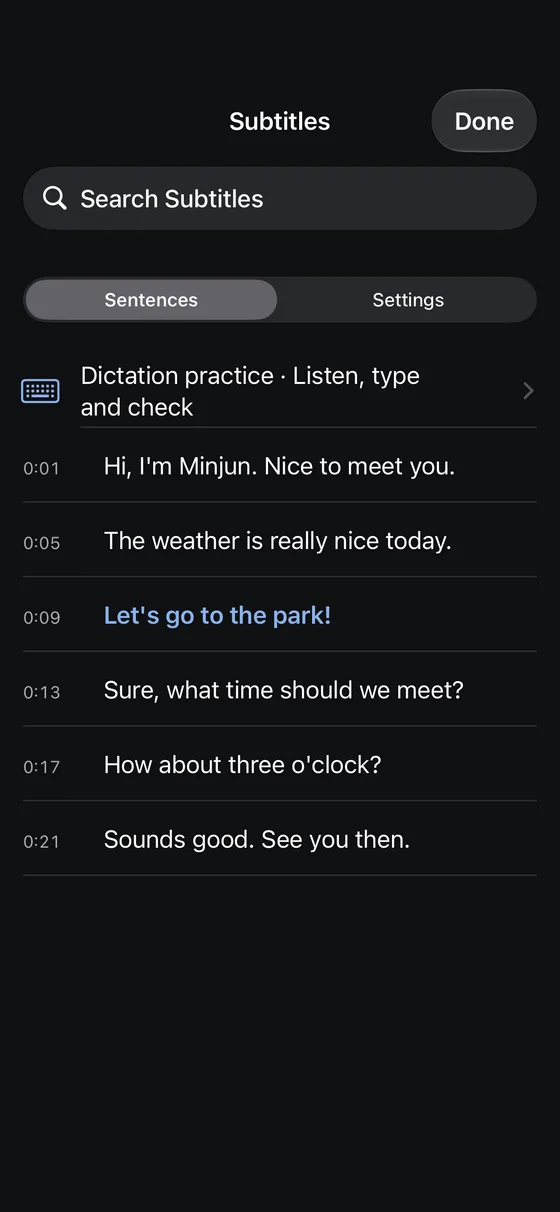
05Subtitles
Hear each line, then say it back
Subtitles free · transcription Pro
- Tap a line to jump there, hold it to loop just that line
- Two subtitles at once, 0.1s sync, hide and reveal
- Dictation practice, and on-device transcription for files without subtitles
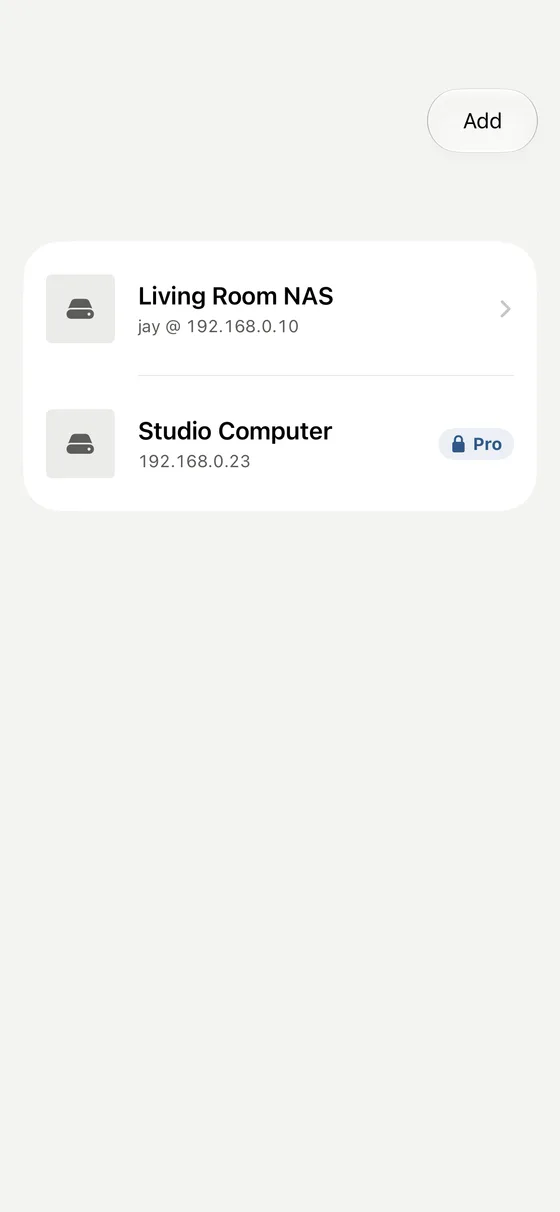
06NAS
Play straight from your home NAS
One share free · more with Pro
- From Import › NAS or the Tools tab, find and connect to SMB shares on the same Wi-Fi
- Passwords stay in the device keychain
- More shares and downloads, with subtitles or whole folders, in Pro
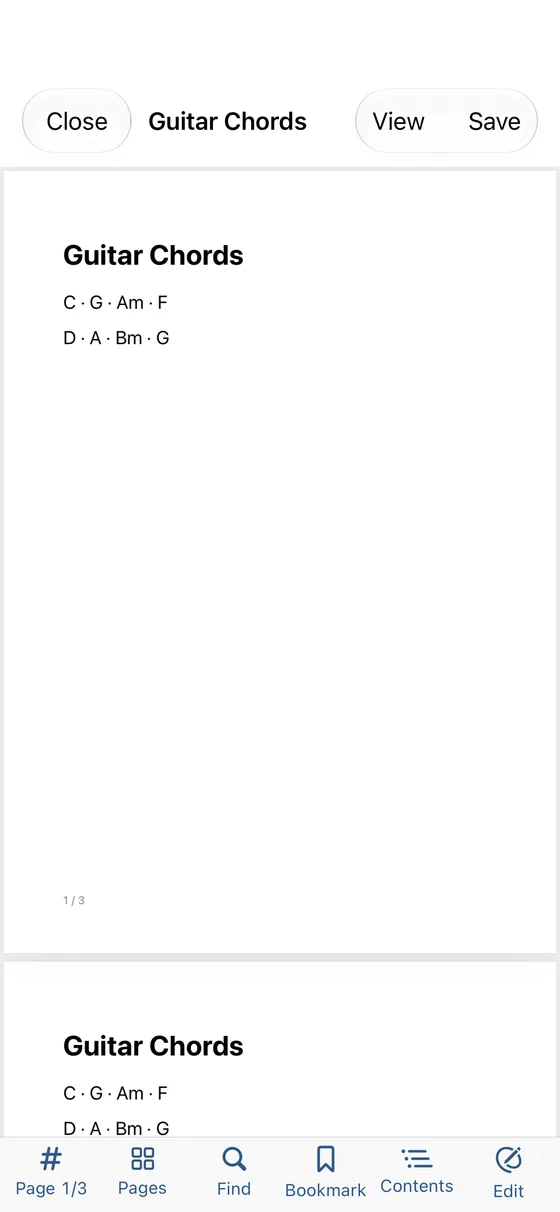
07Documents
Scores and PDFs in the same app
Reading free · editing Pro
- Search, contents, bookmarks and night mode
- Score mode: turn pages with a tap on either side or a pedal
- Highlights, handwriting, signatures, page edits, merge and scan in Pro; save as a new file to keep the original
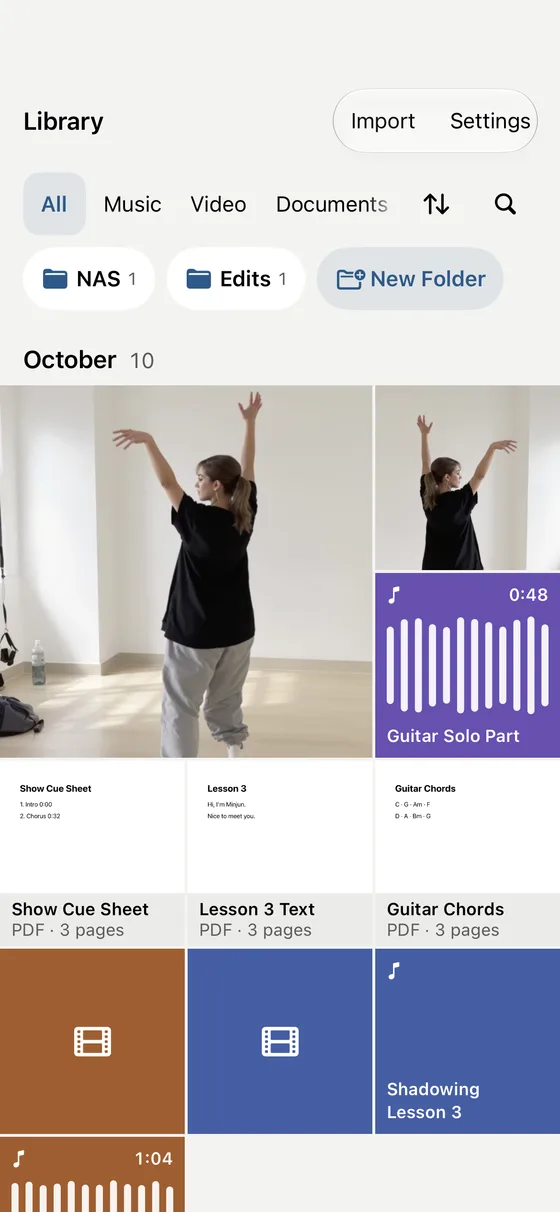
08Library
Your own files. No ads, no internet
Free
- Videos, music and PDFs from every folder in a monthly grid, with your latest practice shown large
- Type, Sort · Select and search in one row; import from Files (whole folders), Photos and Music (unprotected songs)
- Send files to and from a computer browser on the same Wi-Fi
- Ads
- In-app accounts or sign-in
- Behavioural tracking
- Uploading your files
- Subscriptions
Free and Pro
Basic practice is free.
Sections, A–B loops and 0.25–4× speed are free.
The cards and the comparison describe the iPhone and iPad app.
Basic
Free
No sign-up or payment in the app
- Sections · A–B loops · repeat count
- 0.25–4× speed, pitch kept
- Every supported format · subtitles and lyrics
- Dictation practice · practice log
- Library · Wi-Fi transfer · one NAS
- PDF reading · score mode
- Standalone metronome
Pro
One-time purchase
Not a subscription · price in the store and the app
- Rests · count-in · speed ramp · cumulative practice
- Beat and 8-count · metronome locked to the song · spoken count
- Metronome tempo trainer · polyrhythm
- Pitch, EQ and vocal reduction for music in standard formats · vocal and accompaniment separation
- Subtitles from on-device speech recognition
- Mirrored video · camera mirror
- Several NAS shares · PDF markup · video editing
See the full comparison
Practice
Free
Rows of time bars · waveform · sections · A–B points · seamless section loops (music in standard formats, MP4 and MOV in the library) · line loops · repeat count · edge trimming · split by subtitle, lyric or chapter · dictation practice · practice log
Pro
Rests · echo recording · count-in · speed ramp · cumulative practice · next-section mode · beat and 8-count · metronome locked to the song and spoken count · split by beat or pause · on-device transcription · sharing section maps
Sound
Free
0.25–4× speed in 0.01 steps, pitch kept
Pro
Recording yourself to compare with the original · pitch in semitones and cents, three-band EQ, vocal reduction and quiet-audio boost (music files in standard formats in the library only; videos and files played by the extended engine keep their original sound) · vocal and accompaniment separation · chords and key · spectrogram · tuner
Metronome
Free
No song needed: 30–240 BPM · 2–8 beats · tap tempo · click volume · keeps going with the screen off
Pro
Spoken count · tempo trainer (step towards a target every few bars) · polyrhythm
Video and dance
Free
Zoom · frame by frame · picture in picture · AirPlay
Pro
Mirror video · camera mirror
Playback
Free
Every supported format · subtitles and lyrics (LRC) · embedded tracks · resume · background play · lock screen controls · sleep timer · folder repeat and shuffle · keyboard and pedal
Pro
All free
Files and NAS
Free
Library · import from Files (whole folders), Photos and Music (unprotected songs) · Wi-Fi transfer · stream from one NAS
Pro
Several NAS shares · downloads with subtitles or whole folders
Documents (PDF)
Free
Reading · search · contents · bookmarks · night mode · score mode · share · print
Pro
Highlights, text and handwriting · signatures · page edits · merge · scan · PDF from photos · password
Editing
Free
Pro only
Pro
Trim · join · slow down · mirror · extract audio · save a practice section with its speed and pitch
Phone cleanup
Free
Find similar photos, screenshots and large videos · delete one by one
Pro
Clean up in one go · select every screenshot · compress videos, keeping date, place and album
- Buying Pro
- Purchases do not move between the App Store and Google Play.
- Price
- See the price in your local currency on the App Store, on Google Play or in the app.
- On your device
- Transcription runs on the device, as do vocal separation and chord detection (iPhone and Android). Your files are never uploaded.
Countries and languages
Worldwide except mainland China, in 33 languages.
- Where
- The iPhone and iPad app is on the App Store worldwide except mainland China. The Android app is on Google Play worldwide.
- Price
- Pro is a one-time purchase, not a subscription. The App Store and Google Play show the price in your local currency.
- App language
- Madi follows your device language and falls back to English. To change it for Madi alone, open iPhone Settings > Madi > Language, or App languages in your phone’s Settings on Android 13 or later.
- The same everywhere
- No account, and your files are never uploaded. Practice logs and section maps stay on your device.
App languages33
- 한국어
- English
- 日本語
- 简体中文
- 繁體中文
- Español
- Português
- Français
- Deutsch
- Italiano
- Nederlands
- Svenska
- Dansk
- Norsk
- Suomi
- Polski
- Čeština
- Magyar
- Română
- Hrvatski
- Српски
- Ελληνικά
- Русский
- Українська
- Türkçe
- Bahasa Indonesia
- Tiếng Việt
- ไทย
- Filipino
- हिन्दी
- العربية
- עברית
- فارسی
Spot an awkward translation? Let us know and we will fix it in an update. Report a translation
By device
What each device includes.
- iPhone and iPadApp Store worldwide except mainland China · iOS 17.4 or later
Everything this page describes. Pro is bought on the App Store; restore it on other devices with the same Apple account.
- AndroidGoogle Play worldwide · Android 8.0 or later
- FreePlayback (formats the built-in engine cannot open play only while the app is on screen) · section practice · subtitles · dictation practice · starred sentences and Saved sentences · one NAS · Wi-Fi transfer · importing videos from Photos · PDF reading (contents, search, score mode) · standalone metronome
- ProPractice modes · echo recording and recording · beat and a metronome locked to the song · spoken count, tempo trainer and polyrhythm for the metronome · pitch in semitones and cents, EQ, vocal reduction and boost (files opened by the built-in engine) · vocal separation down to drums and bass (the model is installed with the app) · chords with sevenths and inversions, key and spectrogram · tuner · mirrored video · camera mirror · split by pause · transcription (Android 13 or later, on phones with on-device speech recognition) · subtitle translation (Google ML Kit, on this phone) · practice files from saved sentences · sharing section maps and Audacity labels · several NAS shares and downloads · PDF markup and making · paper scanning (Google Play services document scanner) · video and audio editing · saving a section as a file
- Not includedGuaranteed gapless loops · Music app import · AirPlay · phone cleanup
Pro bought on Google Play is separate from Pro bought on iPhone.
- Between devicesNo automatic sync
Practice logs and section maps stay on each device. With the same media file, you can move a section map (.madi) yourself (sending and importing on iPhone and Android is Pro).
Inside the Android app
Listening and practice on Android, too.
Actual Android app views rendered in a test environment. Files and playback states are examples.
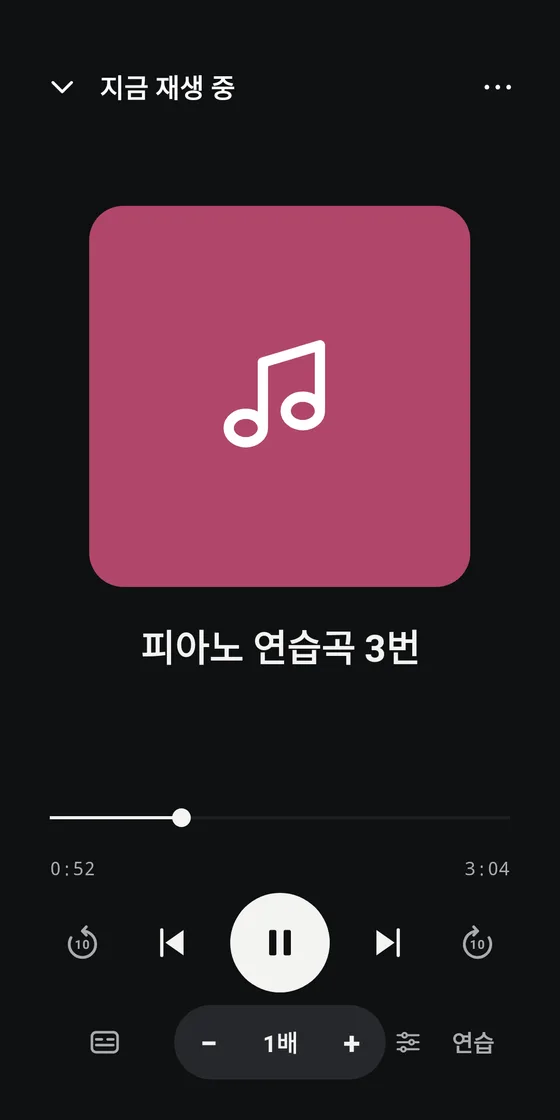
Open music and listen comfortably
Once a song is analyzed, the progress bar becomes a whole-song waveform. Change speed right away with − 1x +, and open Practice when you need it.
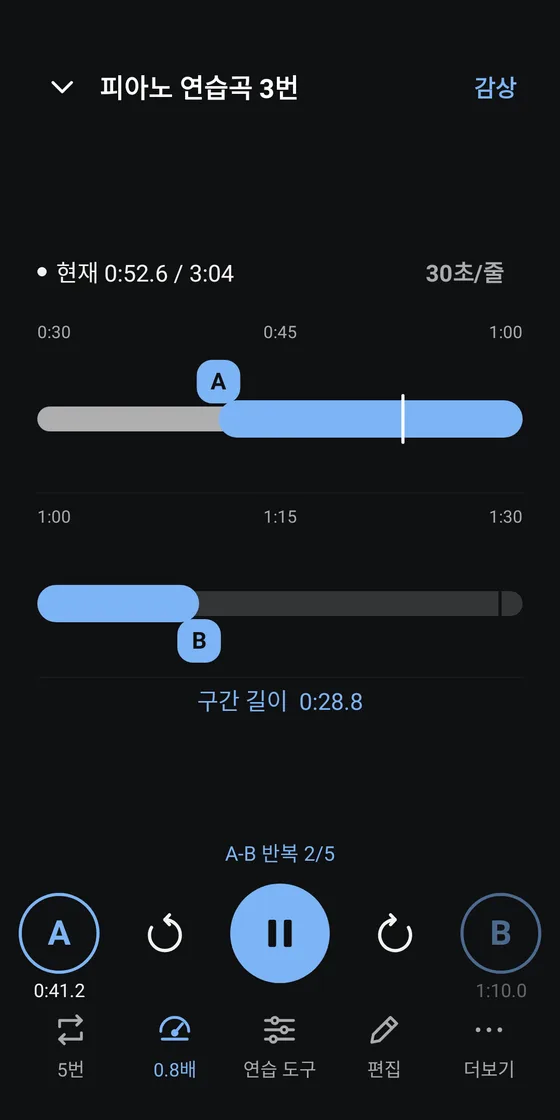
See your range across multiple rows
Choose an A–B range on rows of thick bars, with the loop shown as a highlighted band. Below are one status line, round A, Play and B buttons, and five tools.
Good to know
Common questions
What can I practise with?
Start with video and audio files you already have, including MKV and AVI video with SMI or SRT subtitles. Import them from your device or browse a shared folder on your NAS. Playback support depends on the codec inside the file.
Do I need an internet connection or an account?
Playback and basic practice with files saved on your device work offline, without an account. In-app purchase and restore need an internet connection, and a NAS opens only on the same network. Downloads and Pro use your App Store or Google Play account; you never need a Vivory Lab account.
What is free, and what comes with Pro?
Sections, A–B loops, repeat counts, 0.25–4× speed and the standalone metronome are free. On iPhone and iPad, Pro adds advanced practice modes, beat, pitch, recording, vocal separation, PDF markup and file export. On Android, Pro adds practice modes, beat and a metronome locked to the song, sound tools such as pitch and EQ (files the built-in engine opens), vocal separation, mirrored video, split by pause, transcription (Android 13 or later, on phones with on-device speech recognition), subtitle translation, paper scanning and sharing section maps. Pro is a one-time purchase, not a subscription. See the price in your local currency on the App Store, on Google Play or in the app.
Does Pro bought on iPhone work on Android?
No. Purchases do not move between the App Store and Google Play. Pro bought on iPhone or iPad unlocks on devices with the same Apple account, and Pro bought on Android unlocks on Android devices with the same Google account.
Can I get Madi now?
The iPhone and iPad app is on the App Store worldwide except mainland China. Use the App Store badge on this page. The Android app is on Google Play worldwide. Use the Google Play badge. The store lists supported devices and the latest version.
Is Madi available in my language?
The app comes in 33 languages. It follows your device language and falls back to English for any other. You can also choose a language for Madi alone in iPhone Settings > Madi > Language, or under App languages in your phone’s Settings on Android 13 or later.
Supported files
- Video
- MP4 and MOV (standard formats), plus MKV, AVI, WMV, WebM, TS and more (extended engine)
- Audio
- MP3, M4A, AAC, WAV, FLAC and AIFF (standard formats), plus OGG, Opus, WMA, DTS and more (extended engine)
- Subtitles
- SMI, SRT, VTT and ASS, embedded subtitles, LRC lyrics
- Documents
- Import
- Home NAS (SMB) · Photos · file picker · sharing · Wi-Fi transfer, plus the Music app on iPhone
- App language
- 33 languages · follows your device
Today’s practice
Got a part you want to practise?
Basic practice is free. Start with your own files, no account needed.
Go there
Documents
People practising an instrument, singing, dance or a language on their own
- App Store launch in Korea
- Launch worldwide except mainland China · 33 languages
- Google Play launch · worldwide
- TodayStart free